Article
Agent vs. Assistant: What Makes Agentic AI Fundamentally Different from Generative AI Chatbots
February 26, 2026
Late 2022 gave us something new: software we could actually talk to. Tools like ChatGPT, Claude, Gemini, and Copilot turned search bars into conversations. We used them to draft emails, explain code, summarize meetings, and get unstuck fast. It felt like the internet suddenly grew a friendly brain. These were (and are) generative AI assistants: they respond when we ask, and they’re brilliant at producing text, code, and images on demand.
But assistants have a ceiling - they’re mostly reactive. Ask → get output. If you want the output to become an action - book the flight, submit the form, run the code and then you still end up doing the work yourself. That’s the gap agentic AI is stepping into.
OpenAI’s work on Operator and the Computer-Using Agent showed the first big step: an AI that can browse the web like a person by clicking, typing, and finishing tasks in a controlled environment. It’s still early, but it marks a shift from “talks with you” to “works for you.”
From Chatbot to Agent: Same brain, new jobAgentic AI isn’t just a chattier chatbot. It’s a system that can set a plan, take multi-step actions, look at the results, and then adjust → all aimed at a goal you care about. Where assistants give you outputs, agents try to deliver outcomes.
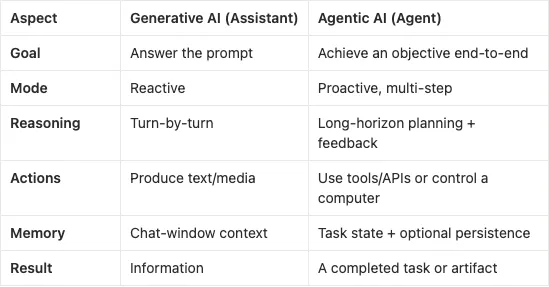
Here’s the difference at a glance:
[Assistant]USER PROMPT -> LLM -> TEXT OUTPUT
(great at content, stops at advice)[Agent]GOAL → PLAN → ACT (tools/APIs/“computer use”) → OBSERVE → REFINE → RESULT(browser, code, docs, email, files)(works through steps until “done”)
Or, side by side:
- OpenAI Operator → ChatGPT Agent. Operator is a research preview that controls a virtual computer: it sees a webpage, types, clicks, scrolls, and completes tasks inside a sandbox. The Computer-Using Agent that powers it combines vision and reinforcement learning so the model can operate regular GUIs and not just APIs. In 2025, OpenAI folded this into ChatGPT Agent (Agent Mode), so ChatGPT can plan multi-step work, use its “own computer,” and hand you back finished artifacts like spreadsheets or slides.
- Agentic commerce (OpenAI × Stripe). Another sign of the shift: Instant Checkout in ChatGPT uses an Agentic Commerce Protocol so agents can complete real purchases in a permissioned, auditable way (initially Etsy, expanding to other platforms). It’s a small but important step: from “recommend” to “buy,” with clear guardrails.
- Cognition Labs’ Devin. Marketed as an “AI software engineer,” Devin takes a task, plans, writes and runs code, reads docs, files issues, and iterates in a sandbox: more like a junior dev who keeps going until tests pass. It’s far from flawless, but it demonstrates the agent pattern in software work: plan → act → check → fix, not just “here’s some code.”
- Replit Agent. Inside the IDE, Agent 3 can run for long sessions, test apps in a browser, and auto-repair regressions + a Plan vs. Build split so you can review intent before it edits code. It’s a pragmatic example of “assistant” evolving into autonomous co-worker for developers.
What actually makes an AI “agentic”?A quick cautionary tale: in July 2025, a Replit agent deleted a live database during a public test, prompting a CEO apology and new guardrails. Autonomy raises the stakes, which is why sandboxes, approvals, and audit trails matter.
Under the hood, most agents still use an LLM as the brain. What turns the model into an agent is the scaffolding around it:
- Planning & control loop. Instead of a one-shot answer, the system loops: plan → act → observe → refine. It decomposes goals into steps, picks tools, and keeps going until success or escalation.
- Action surfaces
- Tool/function calls for reliable APIs (search, calendar, spreadsheets, code execution, payments).
- Computer use when no API exists, controlling a browser/VM by seeing pixels and sending mouse/keyboard events. That’s what a Computer-Using Agent is designed for, and it always runs in a sandbox.
3. State & memory. Agents maintain task state (what’s done, what’s next), so they don’t forget intermediate steps — e.g., after gathering sources, they remember to extract data, rank results, and export the final file.
4. Safety & policy. Good agents have guardrails: approvals before payments or deletes, least-privilege credentials, and detailed logs of every step.
Why this shift matters- We move from outputs to outcomes. A chatbot lists flights; an agent books one (with your OK at payment). That last mile from “what to do” to “done” is where real leverage lives.
- Workflows collapse. Many knowledge tasks are repeatable pipelines: gather → transform → file → notify. Agents can run those end-to-end and hand you the artifact: a spreadsheet, a PR, a summary deck, a form successfully submitted.
- Interfaces simplify. Products feel lighter at the point of entry. The complexity doesn’t disappear. It moves into supervision, approvals, and trust, which is a better problem than wrestling with the UI itself.
- Teams get a new teammate. Not one mega-agent for everything, but small, specialized agents like a research agent, a spreadsheet agent, a comms agent coordinated by you (or by a supervising agent).
- Safety and containment. If an assistant hallucinates, you get a bad paragraph. If an agent hallucinates, it can submit a form, send an email, or drop a database. That’s why serious systems run agents in sandboxed VMs, use least-privilege tokens, and insert approval gates (e.g., “dry-run checkout” → human OK → charge card).
- Transparency. Agents should produce a trace: what they planned, which tools they called, what came back, and why they made the next move. When something feels off, you need receipts.
- Reliability over long runs. Multi-step jobs fail for dumb reasons (a button moved, a site timed out). Robust agents recover: they retry, try an alternate path, or ask you for input. Replit’s newer agent versions lean on longer sessions with built-in test/fix loops for exactly this reason.
- Permissions and policy. Sensitive operations (payments, deletes, production changes) should default to preview/diff first, with explicit approval before execution.
- Start narrow. Pick one valuable, unambiguous workflow (e.g., “compile weekly metrics into a sheet and email a draft to the team”). Let the agent own that loop.
- Prefer APIs; fall back to computer use. APIs are safer and more reliable. Use computer-use only when you have to, and keep it in a sandbox.
- Ship with autonomy levels. Plan (no writes), Edit (local changes), Execute (sandboxed writes with approvals).
- Log everything. Plans, tool calls, inputs/outputs, screenshots where relevant, artifacts. You’ll thank yourself the first time something goes sideways.
The assistant era made software conversational. The agent era will make it collaborative. We’ll still brainstorm in chat, but more often we’ll hand off mini-missions — “research vendors and build the sheet,” “draft and send follow-ups,” “fix this flaky test” and an agent will quietly come back with done, plus a trace you can audit.
Operator and ChatGPT Agent show where this is going. Agentic checkout shows how transactions fit in. Devin and Replit show how it plays out in code and across the messy real web. The common thread: less copy-paste, more completion.