Article
Keep Your iOS Tests Quick by Removing Artificial Delays
February 26, 2026
One of the important things to keep in mind when writing unit tests is to make them as fast as possible. As a project grows, so will the number of tests, which will inevitably make it take longer to run the full test suite. If it takes too long, this will significantly slow down the build-test cycle. This can have several negative effects for developers, including frustration, not running tests, not writing tests, and distraction.
One of the most pernicious ways test suites slow down is artificial delays getting added to tests. The most obvious form of this is by calling a sleep()
function in a test. In a large app I’ve been working on, there are on the order of 5,000 tests. If only 10% of those tests had a small sleep of
1 second, it would add a total of 500 seconds (more than 8 minutes) to the tests. Ideally, when doing development work, you should be able to run
the full suite of tests after any significant change to verify whether you’ve broken anything. Imagine waiting 8 minutes for that cycle.
Let’s dive into some reasons why developers add delays to tests, and try to find alternative ways to write the tests to eliminate delays.
One of the most common places where someone would want to introduce a delay is when waiting for some asynchronous work which calls a
completion handler.
Imagine you have some code like this:
class UserGetter {
    func getUser(_ completionHandler: (User) -> Void) {
        // do some network stuff here…
        completionHandler(user)
    }
}
If we try to write a test for this code, we might start with something like this:
func test_getUser_callsCompletionHandler() {
    let subject = UserGetter()

    var receivedUser: User?
    subject.getUser { user in
        receivedUser = user
    }
    XCTAssertEqual(receivedUser?.name, "John Doe")
}
In this test, it will always fail (unless the network is extremely fast), since the assertion runs immediately after getUser(_:) is called.
But, if we add a sleep call before the assertion, it will have time to finish loading the user:
func test_getUser_callsCompletionHandler() {
    let subject = UserGetter()
    var receivedUser: User?
        subject.getUser { user in
        receivedUser = user
    }

    sleep(1) // Don't actually do this!
    XCTAssertEqual(receivedUser?.name, "John Doe")
}
But we shouldn’t do that for some of the reasons mentioned earlier. The sleep adds a fixed delay to the test, whereas we want to try to keep any
delays to only what is needed for the asynchronous work to complete. If we add, for example, a sleep for 1 second, the test will always take at
least one second to complete, even if the asynchronous work
only takes 200 milliseconds, like in this sample execution:

The goal is for the test to immediately resume execution once the asynchronous work is done. For this, we can use XCTest’s built in support for expectations.
The XCTestExpectation class provides a way for a test to wait for a signal from asynchronous operations, indicating they have completed. The
general pattern of use is as follows:
- The test creates an expectation by calling XCTestCase.expectation(description:), passing a description for the expectation
- The test starts some asynchronous work which calls XCTestExpectation.fulfill() when it completes.
- The test calls XCTestCase.wait(for:) to wait for the expectation to be fulfilled.
Here’s what our test looks like when we add the expectation:
func test_getUser_callsCompletionHandler() {
    let subject = UserGetter()
    var receivedUser: User?
    let expectation = expectation(description: "Waiting for completion handler")
    subject.getUser { user in
        receivedUser = user
        expectation.fulfill()
    }
    wait(for: [expectation])
    XCTAssertEqual(receivedUser?.name, "John Doe")
}
Now, the test will start the getUser() operation and wait for the expectation before asserting the user is not nil. The wait(for:) call will
immediately return as soon as the completion handler calls expectation.fulfill(), so the test does not spend any time waiting that isn’t absolutely necessary. We end up with an execution like this:
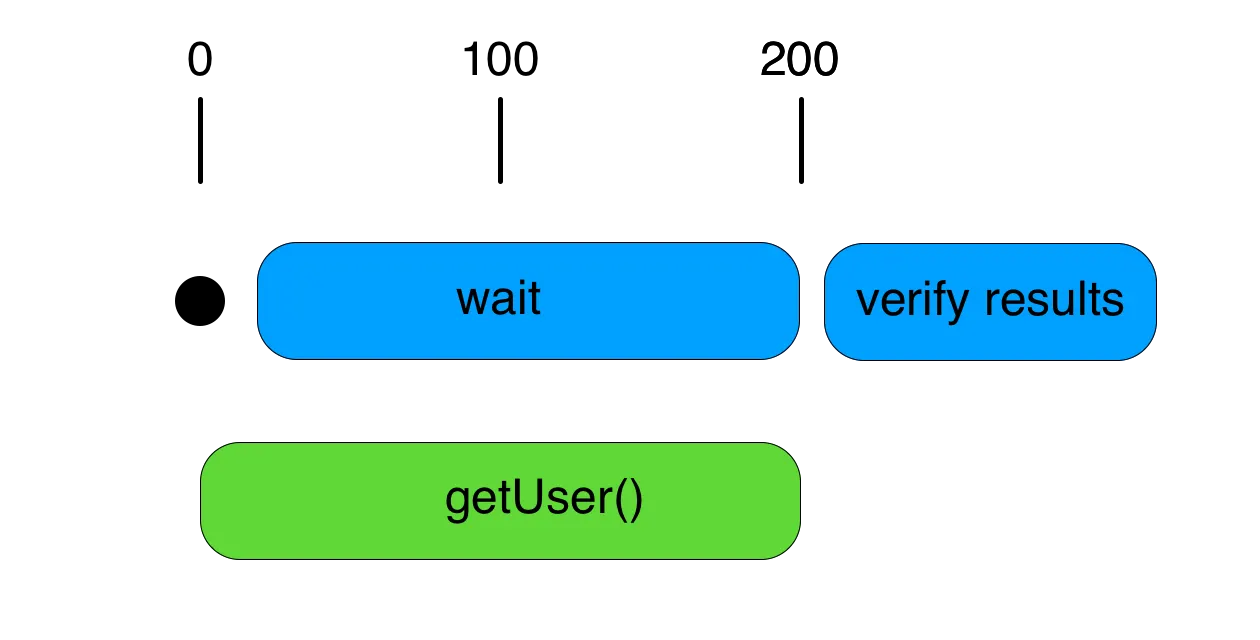
You can see that the execution is much tighter, and there isn’t wasted time like the example with the sleep().
This is one of the more ideal scenarios where an expectation can be used to avoid sleeping in the test. In the examples we took the execution time from 1.2 seconds to 0.2 seconds, which is a significant improvement. Realistically, in most tests you should be able to do much better than 200 milliseconds, and you want to get as close to zero as possible, so you can get quick feedback as your project grows.