Article
Charting a Course from Android Compose Nav2 to Nav3: Use Metadata for Transition Animations
July 27, 2026

Defining destination-level animations is a crucial part to any navigation framework. In Nav2 destination transitions were configured directly within the nav graph’s builder.
composable<MainRoute.Inbox>(
    enterTransition = { slideInHorizontally() },
    exitTransition = { slideOutHorizontally() },
    popEnterTransition = { slideInHorizontally() },
    popExitTransition = { slideOutHorizontally() },
) {
    InboxScreen(...)
}
It was very easy to make helper functions to abstract away common animation patterns. Something like this:
inline fun <reified T : Any> NavGraphBuilder.horizontallySlidingComposable(
    noinline content: @Composable AnimatedContentScope.(NavBackStackEntry) -> Unit,
): Unit =
    composable<T>(
        content = content,
        enterTransition = { slideInHorizontally() },
        exitTransition = { slideOutHorizontally() },
        popEnterTransition = { slideInHorizontally() },
        popExitTransition = { slideOutHorizontally() },
    )
horizontallySlidingComposable<MainRoute.Inbox>) {
InboxScreen(...)
}This is a great strength and it is still possible in Nav3!
Improved Predictive Back Support
If you aren’t familiar with this predictive back as a concept, take a peak at the official docs , but the basic idea is that the back animation is predictive and therefore scrubbable.
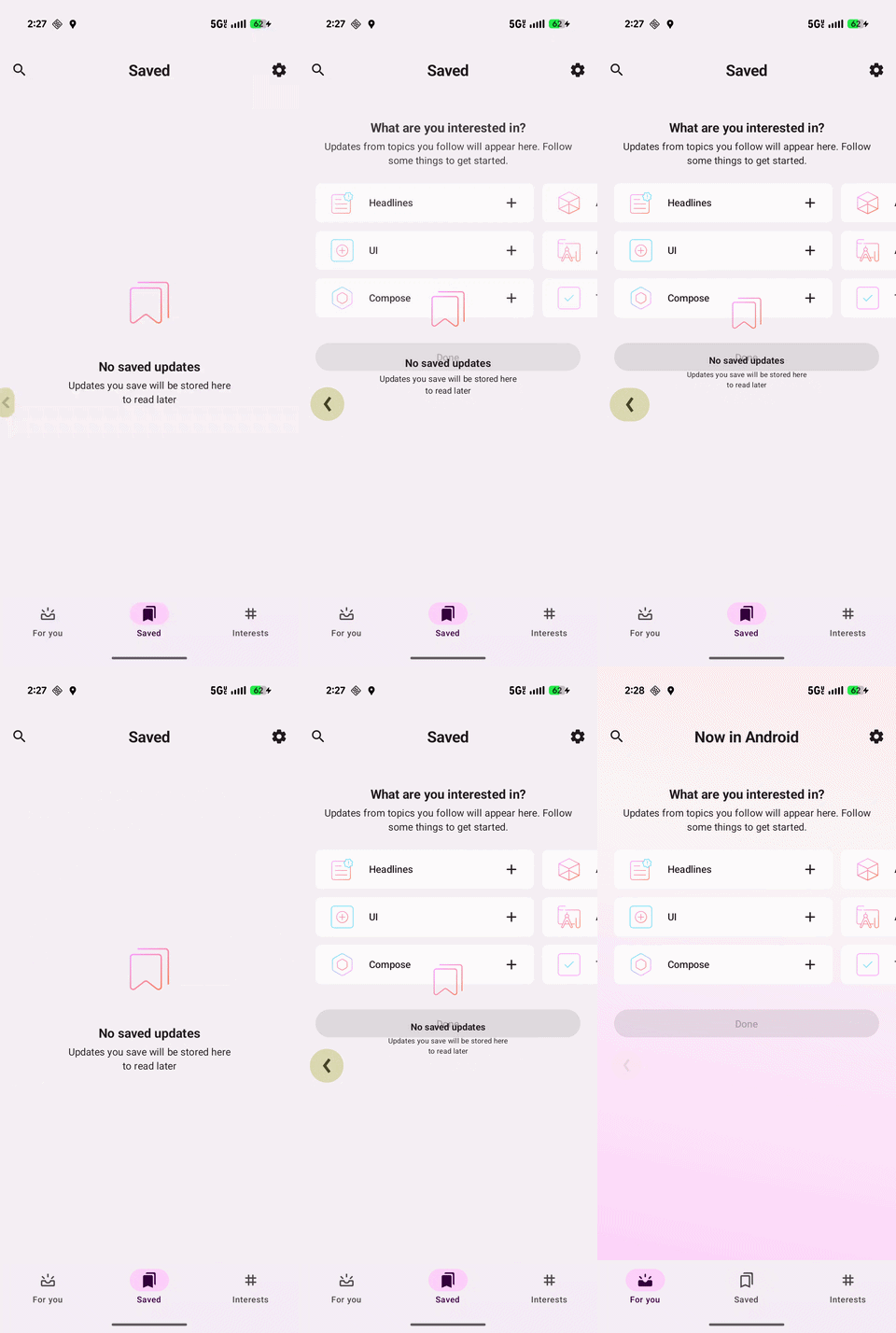
In Nav2 the predictive back behavior was the same as the pop animation, but like I said, scrubbable. In Nav3 we can actually specify a distinct predictive back behavior; more on that later.
Nuts and Bolts
In Nav3, the animation behavior is still attached to the entry’s definition, but the animation model shifts a little bit. Instead of attaching transitions directly to composable destinations, transitions are defined as metadata on entries using special keys:
NavDisplay.TransitionKey: for metadata to notify theNavDisplayof how the content should be animated when adding to the backstack.NavDisplay.PopTransitionKey: for metadata to notify theNavDisplayof how the content should be animated when popping from backstack.NavDisplay.PredictivePopTransitionKey: for metadata to notify theNavDisplayof how the content should be animated when popping from backstack using a predictive back gesture.
In practice, you will have something like this:
entry<MainRoute.Inbox>(
    metadata = metadata {
        put(NavDisplay.TransitionKey) {
            slideInHorizontally() togetherWith slideOutHorizontally()
        }
        put(NavDisplay.PopTransitionKey) {
            slideInHorizontally() togetherWith slideOutHorizontally()
        }
        put(NavDisplay.PredictivePopTransitionKey) {
            slideInHorizontally() togetherWith slideOutHorizontally()
        }
    },
) {
    InboxScreen(...)
}
The official NavDisplay API supports this metadata-based transition model, including defining those keys I mentioned for normal transitions, pop transitions, and predictive-pop transitions. And as I said, we can still make the helper functions:
inline fun <reified T : Any> EntryProviderScope<in T>.horizontallySlidingEntry(
    noinline content: @Composable (T) -> Unit,
): Unit =
    entry<T>(
        content = content,
        metadata = metadata {
            put(NavDisplay.TransitionKey) {
                TransitionDefaults.Enter.slideLeft togetherWith TransitionDefaults.Exit.stay
            }
            put(NavDisplay.PopTransitionKey) {
                TransitionDefaults.Enter.alreadyThere togetherWith TransitionDefaults.Exit.pushRight
            }
            put(NavDisplay.PredictivePopTransitionKey) {
                TransitionDefaults.Enter.alreadyThere togetherWith TransitionDefaults.Exit.pushRight
            }
        },
    )
horizontallySlidingEntry<MainRoute.Inbox>) {
InboxScreen(...)
}To Recap
In Nav2
The pattern looked like this:
- Extend
NavGraphBuilder - Register a
composable<T>() - Attach transitions directly through destination transition parameters
- Predictive back defaults to
popEnterTransitionandpopExitTransitionafter 2.8.0
In Nav3
The pattern becomes:
- Extend
EntryProviderScope<K> - Register an
entry<T>() - Define separate
metadataanimation values forNavDisplay.TransitionKey,NavDisplay.PopTransitionKey, andNavDisplay.PredictivePopTransitionKey
Conclusion
The shape of the basic animation API is very similar once you get used to the new metadata mapping system. Additionally, you must specify an animation with the key of NavDisplay.PredictivePopTransitionKey if you want to override the default predictive back behavior.
Migration guidance
Consider these rules of thumb when migrating animation behavior from Nav2 to Nav3:
- If a destination had custom transitions in Nav2, move that behavior into
entrymetadata in Nav3. - Start specifying predictive back animations.
- For destinations with reusable animation patterns, it still makes sense to keep helper abstractions.
Up next: rework bottom sheet navigation destinations .
Lucas is very animated (often predictably so) at Livefront.